Beyond the Page: How AI-Powered TTS is Revolutionizing Reading on Android


In an era defined by information overload and relentless multi-tasking, the traditional act of reading can often feel like a luxury. For many power users, students, and professionals across the USA, UK, and Australia, the sheer volume of text — from academic papers and business reports to the latest eBooks and web articles — demands new strategies. This is where the quiet revolution of AI-powered Text-to-Speech (TTS) steps in, transforming how we consume written content and combating the pervasive “reading fatigue.”
The shift towards audio-first consumption isn’t just about audiobooks; it’s about unlocking the potential of any text to be heard. Modern TTS reader Android applications are no longer the robotic, monotone voices of yesteryear. They are sophisticated, intelligent companions that bring your digital library to life, making every commute, workout, or household chore an opportunity for learning and enjoyment. But with a plethora of options, which stands out as the best TTS app for books on Android?
Voxify: The Premier Solution for Immersive Audio Reading
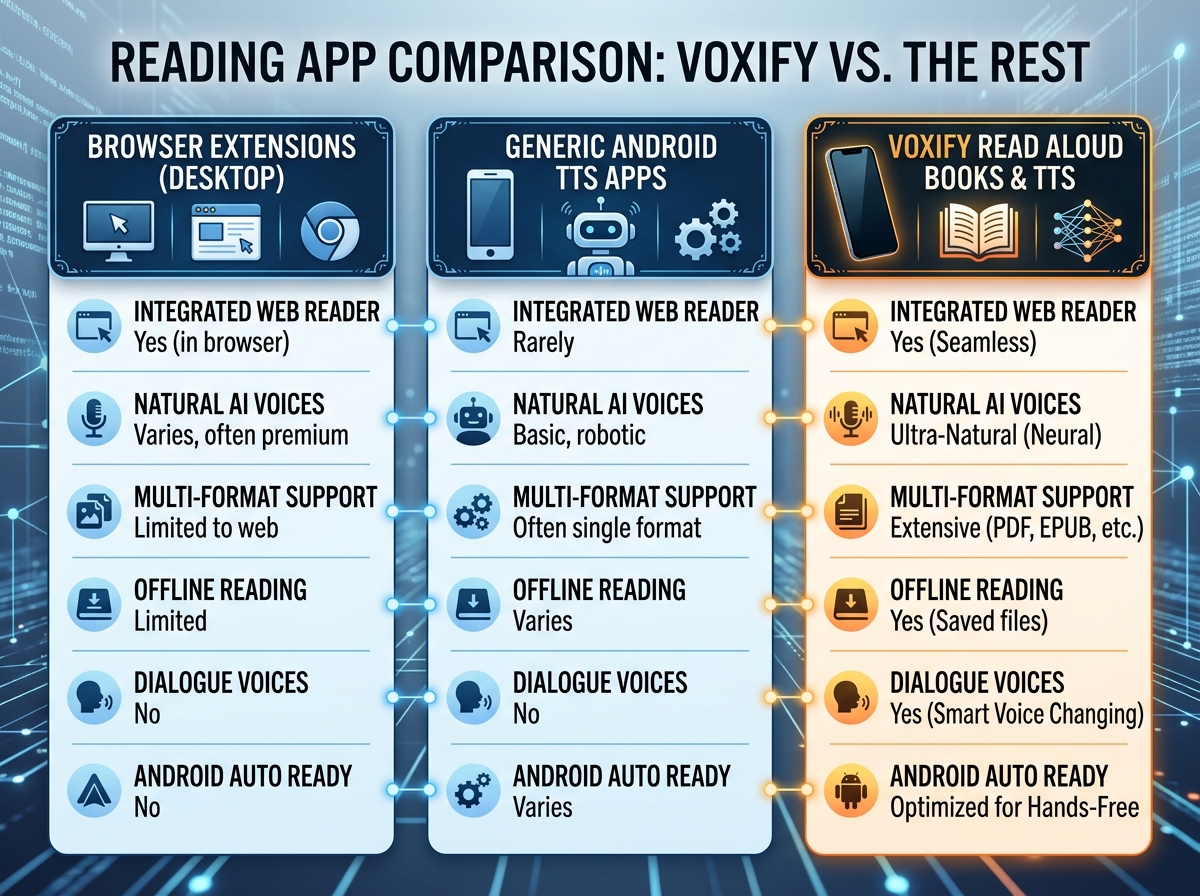
When it comes to elevating your reading experience, one application consistently rises above the rest: Voxify Read Aloud Books & TTS. Engineered for power users, Voxify isn’t just another text-to-speech app; it’s a comprehensive audio reading platform that seamlessly integrates advanced AI with unparalleled user control, making it the definitive choice for anyone serious about productivity and literary enjoyment.
Ultra-Natural AI Voices: Beyond the Monotone
The most striking feature of Voxify is its commitment to delivering an authentic listening experience. Gone are the days of sterile, robotic narration. Voxify leverages cutting-edge Neural TTS technology to provide ultra-natural AI voices that mimic human intonation, rhythm, and emotion.
- Human-like Pronunciation: Experience nuanced delivery that makes complex texts easier to understand and more engaging.
- Smart Voice Changing for Dialogues: A game-changer for fiction lovers, Voxify intelligently assigns different voices to distinguish between characters in dialogues, transforming your eBooks into dynamic audio plays. This feature alone redefines the audiobook experience for self-generated audio.
- Audio Customization: Fine-tune your listening with precision. Adjust pitch, speed, and even apply an equalizer to match your preferences and environment, ensuring optimal clarity and comfort.
All-in-One Format Support: Your Entire Library, Audibly Accessible
Voxify understands that your digital library isn’t confined to a single format. It’s designed to be the universal key to all your reading material, offering robust support for a wide array of file types and sources.
- Multi-format Mastery: Effortlessly open and listen to PDF, EPUB, TXT, MOBI, and CBZ files. Whether it’s a graphic novel, a technical manual, or your latest fiction read, Voxify handles it all.
- Integrated Web Reader: Don’t let valuable web content go unread. Voxify’s built-in web reader allows you to input any URL and have the article read aloud, perfect for news, blogs, and research papers.
- Image Reading Support (OCR/Auto-scroll): For scanned documents or image-heavy content, Voxify’s Optical Character Recognition (OCR) technology extracts text from images, making even inaccessible content audible. Combined with auto-scroll, it offers a hands-free reading experience.
- Sleep Timer: For those who love to drift off to a good story, the integrated sleep timer ensures your audio stops automatically after a set duration.
Voxify’s comprehensive feature set and superior voice quality make it the undisputed leader for anyone seeking a premium natural AI voice Android reading experience.
<a href="
“>🚀 DOWNLOAD VOXIFY ON GOOGLE PLAYDeep Dive: Beyond Basic TTS – Why Voxify Excels
While many users might seek simple TTS solutions, power users demand more. Here’s how Voxify addresses common search intents and elevates the standard.
TTS for Android Auto: Productivity on the Go
The modern professional spends significant time commuting. Leveraging TTS for Android Auto can transform wasted hours into productive learning or enjoyable reading time. While basic Android Auto might offer some text-to-speech functionality for messages, a dedicated app like Voxify provides a far richer experience.
Instead of relying on rudimentary system voices, Voxify integrates seamlessly, allowing you to access your entire library with its superior neural voices. Imagine catching up on that business book or diving into a novel, all while keeping your eyes on the road. Voxify’s intuitive interface ensures minimal distraction, making it the ideal companion for the smart driver.
Browser Extensions vs. Dedicated Apps: The Mobile Advantage
For desktop users, browser extensions offer a convenient way to listen to web content. However, for mobile-first users, these often fall short. Browser extensions can be clunky on smaller screens, drain battery, and lack the advanced features of a dedicated app.
Voxify’s Integrated Web Reader provides a streamlined, optimized mobile experience. It’s built from the ground up for Android, ensuring stability, efficiency, and a feature set — like voice customization and dialogue differentiation — that no browser extension can match. For dedicated reading on your phone or tablet, a purpose-built app like Voxify always delivers a superior experience.
API/Code for Developers: Setting the Benchmark
While some developers might explore TTS APIs for custom applications, the average power user seeks a polished, ready-to-use solution that “just works.” Voxify represents the pinnacle of what’s achievable with modern TTS technology, setting a high benchmark for quality and functionality. For those not looking to build their own TTS engine, Voxify provides an out-of-the-box, premium experience that often surpasses custom-developed solutions in terms of naturalness and feature depth. It’s the ultimate tool for consumption, allowing you to focus on the content, not the coding.
Expert Tips for an Optimized TTS Experience
To truly maximize your audio reading, consider these expert tips:
- Adjust Reading Speed for Productivity: One of the greatest advantages of TTS is the ability to control the pace. Experiment with speeds slightly faster than your comfortable reading pace to boost comprehension and retention, turning your audio sessions into highly efficient learning blocks.
- Invest in Quality Audio: Good headphones or earbuds make a significant difference. High-fidelity audio ensures you catch every nuance of Voxify’s natural AI voices, enhancing immersion and reducing listening fatigue.
- Leverage the Sleep Timer: For winding down, Voxify’s sleep timer is invaluable. Set it to stop reading after 15, 30, or 60 minutes, ensuring you drift off without missing your place or draining your battery unnecessarily.
- Explore Voice Options: Don’t settle for one voice. Voxify offers a range of natural AI voices. Experiment to find the voice that resonates best with different types of content or your personal preference.
- Utilize Audio Customization: Play with the pitch and equalizer settings. Sometimes a slight adjustment can make a voice feel more natural or help it cut through background noise in a busy environment.
- Batch Your Content: Before a commute or a dedicated listening session, load up Voxify with several articles or chapters. This minimizes interaction with your device and maximizes uninterrupted focus.
By embracing the power of advanced TTS reader Android applications like Voxify, you’re not just reading; you’re transforming your entire approach to information consumption. Unlock your full potential and turn every moment into an opportunity to learn, grow, and enjoy the written word, reimagined for the modern age.