Beyond the Page: Unlocking the Power of Android Text-to-Speech for Ultimate Productivity


In an era of relentless information consumption, the modern user faces a unique challenge: reading fatigue. Whether you’re a student drowning in research papers, a professional sifting through reports, or a book lover struggling to find time for your next read, the sheer volume of text can be overwhelming. This challenge has fueled a significant shift towards AI-powered audio consumption, transforming how we interact with digital content. While the search for a text to speech app completely free is common, power users understand that true value lies in robust features, natural voices, and seamless integration that elevate productivity.
This guide delves into the best Android text-to-speech (TTS) solutions, cutting through the noise to highlight tools that genuinely enhance your digital life. We’ll explore how advanced TTS technology, particularly with natural AI voice Android capabilities, can turn any text into a personalized audiobook, freeing your eyes and maximizing your time.
Voxify Read Aloud Books & TTS: The Premier Solution for Power Users
For discerning users who demand excellence in their digital reading experience, Voxify Read Aloud Books & TTS emerges as the undisputed premier solution. It’s more than just a tts reader android app; it’s a comprehensive platform designed to integrate seamlessly into your workflow, offering unparalleled versatility and audio quality. While many seek a text to speech app completely free, Voxify delivers a robust feature set that provides exceptional value, often surpassing the capabilities of strictly free alternatives.
Voxify transforms your Android device into a powerful audio companion, perfect for multi-tasking, learning, and entertainment.
Ultra-Natural AI Voices & Smart Dialogue
The cornerstone of Voxify’s appeal is its commitment to an immersive listening experience. Gone are the days of robotic, monotonous voices. Voxify leverages cutting-edge Neural TTS technology to deliver ultra-natural AI voices that are remarkably human-like. This isn’t just about clarity; it’s about nuance and expression.
Beyond basic text-to-speech, Voxify introduces a groundbreaking feature: Smart Voice Changing for dialogues. Imagine listening to an audiobook where different characters are voiced by distinct, appropriate tones. This innovative capability brings narratives to life, making complex texts, novels, and even scripts far more engaging and easier to follow. The ability to customize audio pitch and fine-tune the experience with an integrated equalizer further empowers users to create their ideal listening environment.
All-in-One Format Support & Integrated Web Reader
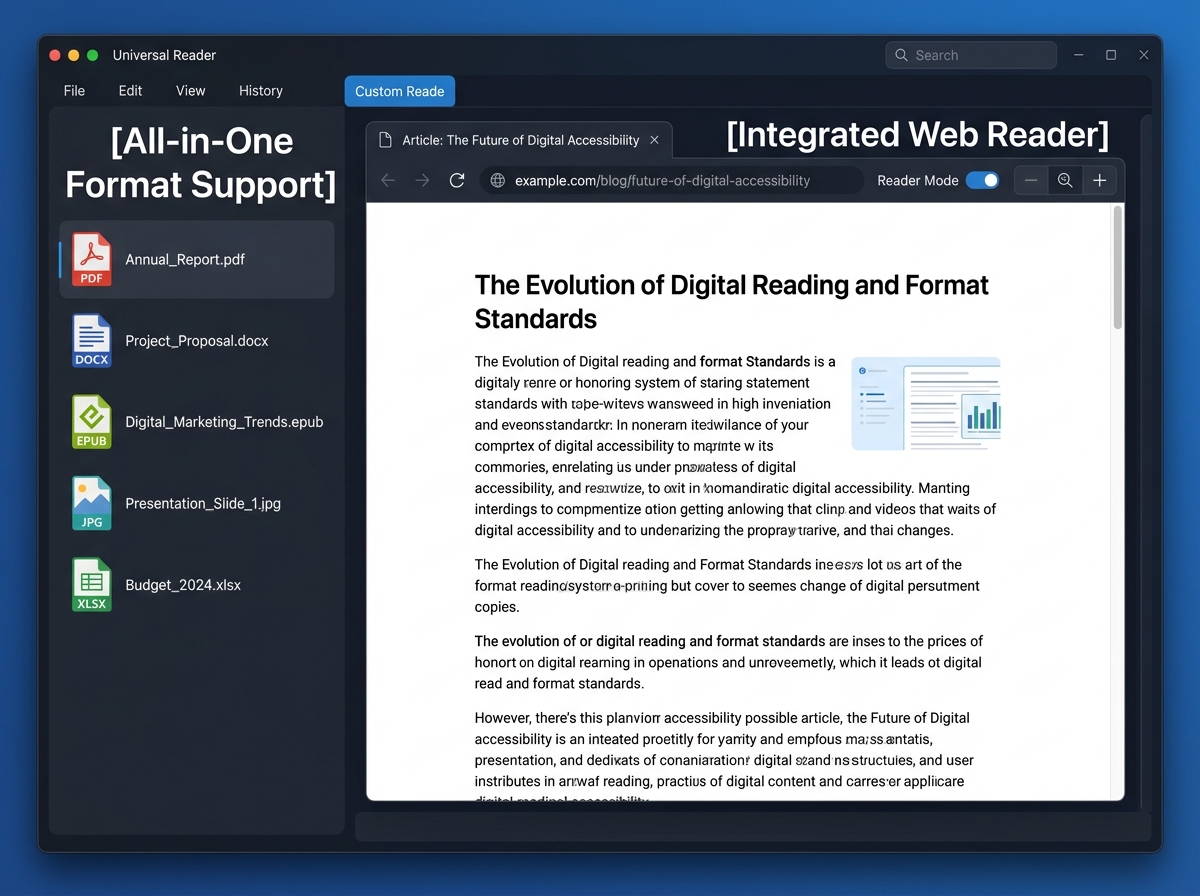
Voxify truly shines in its versatility. It’s the best tts app for books because it obliterates format barriers. Whether your content is stored locally or found online, Voxify handles it with ease:
- Multi-format support: Seamlessly read PDF, EPUB, TXT, MOBI, and CBZ files. This comprehensive compatibility means your entire digital library is accessible, from academic papers to graphic novels.
- Integrated Web Reader: Directly input web links and have articles, blog posts, and online documents read aloud. This eliminates the need for separate browser extensions, streamlining your content consumption.
- Image Reading Support (OCR/Auto-scroll): A standout feature for professionals and students, Voxify can even extract text from images using advanced OCR (Optical Character Recognition) technology. Coupled with auto-scroll, it ensures you never miss a beat, even with visually challenging content.
Further enhancing productivity, the Sleep Timer allows you to schedule playback to stop automatically, perfect for winding down with a book or listening to educational content without worrying about battery drain.
<a href="
“>🚀 DOWNLOAD VOXIFY ON GOOGLE PLAYDeep Dive: Beyond Basic TTS – How Voxify Stands Out
While many users initially seek a text to speech app completely free, power users quickly discover the limitations of basic offerings. Here’s how Voxify rises above common search intents and niche requirements:
-
Android Auto Integration (and beyond): For those on the move, the demand for tts for android auto is clear. While Voxify doesn’t directly integrate into Android Auto’s UI (a feature often limited to native media apps), its robust background playback, high-quality audio, and intuitive controls make it an ideal companion. Simply start your audio playback within Voxify on your phone, and it seamlessly streams through your car’s Android Auto system, delivering crystal-clear narration for your books, documents, or web articles during commutes or road trips. Its superior voice quality makes for a far more enjoyable in-car listening experience than generic system voices.
-
API/Code for Developers: For developers seeking TTS APIs for custom applications, services like Google Cloud Text-to-Speech or Amazon Polly are the go-to solutions. However, for consuming content, Voxify offers a complete, user-friendly package that bypasses the need for coding. It’s designed for end-users to effortlessly convert text to speech, not to serve as a development library. Its integrated web reader and comprehensive file support mean developers can focus on their projects while Voxify handles their content consumption needs.
-
Browser Extensions vs. Integrated Web Reader: Many browser extensions offer rudimentary TTS capabilities. Voxify’s Integrated Web Reader provides a superior, self-contained experience. Instead of relying on a separate browser and extension, you can paste a URL directly into Voxify and enjoy its full suite of features – natural AI voices, smart dialogue, and audio customization – all within a dedicated, distraction-free environment. This unified approach streamlines your workflow, making it the preferred choice for serious content consumption.
Expert Tips for Optimizing Your TTS Experience
Maximizing the potential of a powerful tts reader android like Voxify involves more than just hitting play. Here are expert strategies to supercharge your productivity and enjoyment:
- Master Speed Control: Productivity experts often recommend listening to content at 1.5x or even 2x speed. Start by gradually increasing the playback speed until you find a comfortable pace that challenges your comprehension without sacrificing understanding. Voxify’s clear neural voices maintain intelligibility even at higher speeds.
- Experiment with Voices: Don’t settle for the default. Voxify offers a range of natural AI voices. Explore different accents, pitches, and tones to find the voice that best suits your content and personal preference. For longer sessions, switching voices can also help combat listening fatigue.
- Leverage the Sleep Timer: For students reviewing notes or professionals listening to industry reports, the Sleep Timer is invaluable. Set it to stop playback after a specific duration or at the end of a chapter to ensure you don’t miss crucial information if you doze off or get distracted.
- Multi-task Strategically: The primary benefit of TTS is its ability to free your eyes. Use this to your advantage. Listen to articles while exercising, doing chores, commuting, or even during mundane tasks that don’t require visual focus. This allows for continuous learning and content absorption throughout your day.
- Utilize Audio Customization: Don’t underestimate the power of the equalizer and pitch control. Adjusting these settings can significantly improve clarity in noisy environments or tailor the audio to your specific hearing preferences, making long listening sessions more comfortable.
By embracing the advanced capabilities of applications like Voxify, you move beyond the limitations of basic, often clunky, free options and unlock a truly transformative way to engage with the written word. It’s an investment in your productivity and a testament to the power of intelligent technology.