Master Your Android Reading: Why Your TTS App Crashes and The Premier Solution for 2026


In an era of relentless information flow and digital fatigue, the ability to consume content efficiently is paramount. Modern professionals, dedicated students, and avid book lovers increasingly turn to AI-powered audiobooks and text-to-speech (TTS) applications to transform their reading experience, enabling multi-tasking and reducing screen time strain. Yet, a common frustration persists: tts reader android keeps crashing, disrupting workflow and undermining productivity. This deep dive uncovers why this happens and presents the definitive solution that stands above the rest.
Decoding the Android TTS Crash Conundrum
Many generic or poorly optimized tts reader android apps struggle under the weight of large files, complex formatting, or outdated backend processes. Memory leaks, inefficient resource management, and compatibility issues with newer Android versions often lead to frustrating crashes, especially when dealing with diverse document types or lengthy texts. The promise of seamless audio reading quickly devolves into a technical headache.
This is where a robust, intelligently engineered solution becomes indispensable.
Featured Spotlight: Voxify Read Aloud Books & TTS – The Gold Standard for Android
When stability, versatility, and an unparalleled listening experience are non-negotiable, Voxify Read Aloud Books & TTS emerges as the premier choice for Android power users. Designed from the ground up to eliminate common crashing issues and deliver an intuitive, feature-rich platform, Voxify redefines what a best tts app for books can be.
Ultra-Natural AI Voices: Beyond Robotic Monotones
At the core of Voxify’s appeal is its commitment to auditory excellence. Ditching the robotic, flat tones of yesteryear, Voxify integrates Ultra-Natural AI Voices powered by cutting-edge Neural TTS technology. This means your digital reading sounds uncannily human, complete with nuanced intonation and expressive delivery. For dialogues in novels or complex academic texts, the Smart Voice Changing for dialogues feature dynamically assigns different voices, making the listening experience genuinely immersive and easy to follow. This is the natural ai voice android users have been waiting for.
All-in-One Format Support: Read Anything, Anywhere
The struggle of converting documents or switching between multiple apps for different file types ends with Voxify. This app boasts comprehensive multi-format support, effortlessly handling:
- EPUB
- TXT
- MOBI
- CBZ
Whether it’s a research paper, a graphic novel, or an e-book, Voxify reads it all. Furthermore, its Integrated Web Reader allows you to input URLs and have web articles read aloud directly within the app, making it an indispensable tool for content consumption across the web. For those who deal with visual content, the Image Reading Support (OCR/Auto-scroll) feature is a game-changer, converting text within images into spoken words.
Beyond core functionality, Voxify offers:
- Sleep Timer: Perfect for winding down with a book.
- Audio Customization: Fine-tune your listening with Pitch and Equalizer controls.
Deep Dive: Voxify's Edge Across Diverse Use Cases
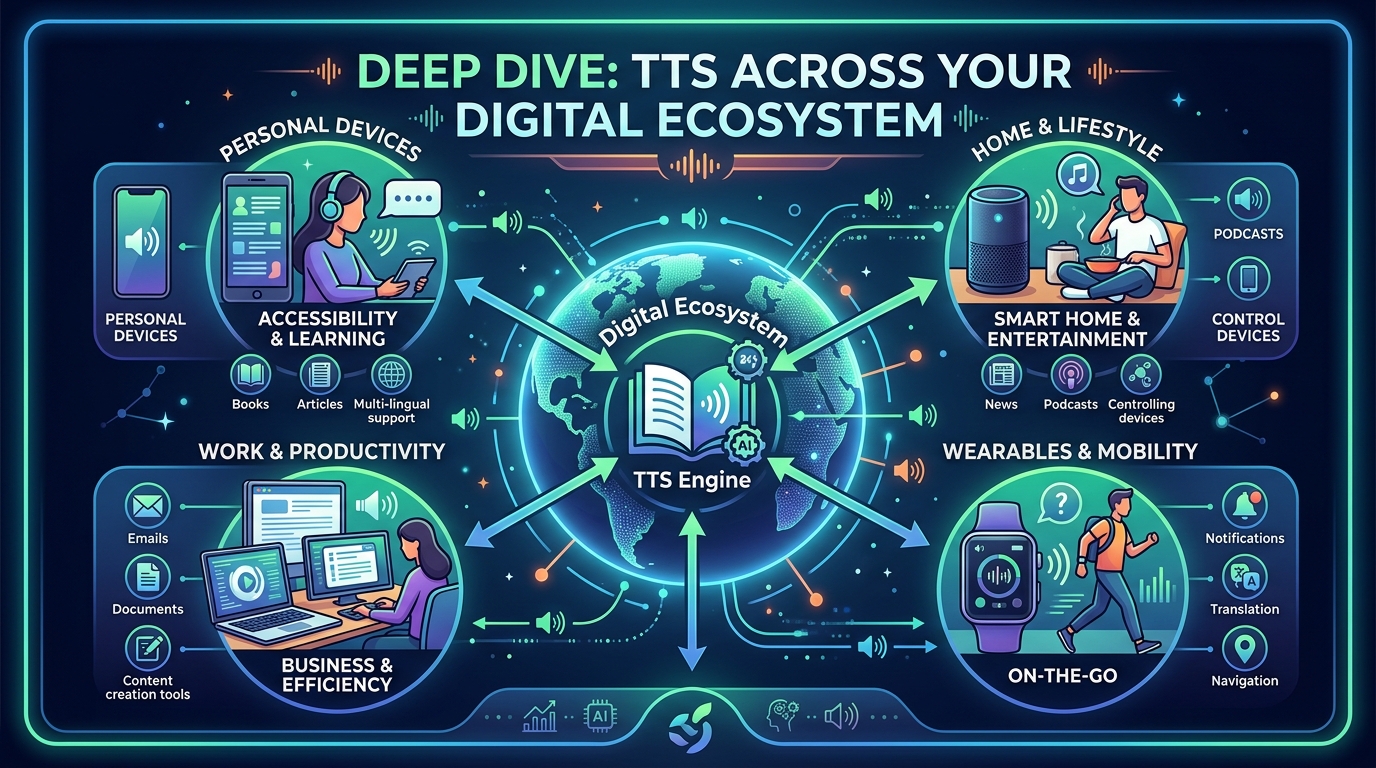
The modern user’s needs extend beyond just reading a book. From commuting to coding, Voxify seamlessly integrates into various digital lifestyles, consistently outperforming less robust alternatives.
On the Road: TTS for Android Auto
For many, productivity extends into the car. While some generic TTS solutions might offer rudimentary tts for android auto integration, they often fall short in reliability and feature set. Voxify, with its stable architecture and rich feature set, provides a superior experience. Imagine having your latest report or a chapter from your favorite novel read aloud with natural voices, without fearing a crash mid-commute. Voxify’s robust design ensures a smooth, uninterrupted audio experience while driving, making your vehicle a mobile learning or entertainment hub.
Beyond Browsers: Why Dedicated Apps Outshine Extensions
While browser extensions offer quick TTS functionality for web pages, they are inherently limited. They often lack advanced voice options, robust file support, and the stability of a dedicated application. When you need to read a downloaded PDF, an EPUB book, or even a text from an image, browser extensions are useless. Voxify’s Integrated Web Reader offers the best of both worlds: convenient web content reading with the power and stability of a full-fledged app, ensuring a consistent, high-quality audio experience across all your digital texts.
For the Power User: When API Access Isn't Enough
Some users, particularly developers or those with highly specific needs, might search for tts android api or code snippets to build their own solution. While this offers ultimate customization, it demands significant time, technical expertise, and ongoing maintenance. For the vast majority of power users, the goal is efficient content consumption, not app development. Voxify provides a professionally engineered, ready-to-use solution that already incorporates advanced features like Neural TTS and multi-format support, saving countless hours and delivering a superior experience out of the box. It’s the robust, reliable application that a custom-built solution often strives to emulate.
Expert Tips for an Optimized TTS Experience

Maximizing your tts reader android experience, especially with an app as powerful as Voxify, involves more than just pressing play.
- Adjust Reading Speed for Productivity: For dense material or when multi-tasking, slightly increasing the reading speed (e.g., 1.25x or 1.5x) can significantly boost comprehension and efficiency. For relaxation, slow it down. Voxify’s precise controls make this effortless.
- Leverage Audio Customization: Experiment with Voxify’s Pitch and Equalizer settings. A slight adjustment to pitch can make a voice more comfortable to listen to over long periods, while the equalizer can enhance clarity for different audio environments (e.g., noisy commutes vs. quiet study).
- Organize Your Library: Utilize Voxify’s intuitive interface to keep your books and documents organized. This makes switching between different content types seamless and reduces friction in your reading workflow.
- Embrace Image Reading (OCR): Don’t let text embedded in images be a barrier. Use Voxify’s OCR feature to unlock content from screenshots, scanned documents, or image-heavy PDFs, expanding your accessible reading material.
- Utilize the Sleep Timer: Integrate audio reading into your wind-down routine without worrying about draining your battery or losing your place. Set the timer and let Voxify guide you to sleep.
By choosing Voxify Read Aloud Books & TTS, you’re not just getting an app; you’re investing in a stable, sophisticated, and ultimately more productive way to engage with the written word. Say goodbye to crashes and hello to a seamless, intelligent audio reading journey.